In brief: The best accounting software for most small businesses in 2026 is QuickBooks Online for its feature depth and glob accountant support. Xero is the best pick for microbusinesses and teams — it pairs the easiest, cleanest interface in the industry with unlimited users on every plan. Wave is best for solopreneurs who mainly need free invoicing, FreshBooks for service businesses that bill by time or project, and Zoho Books for automation on a budget.
_______________________________________________
Best Accounting Software at a Glance (2026)
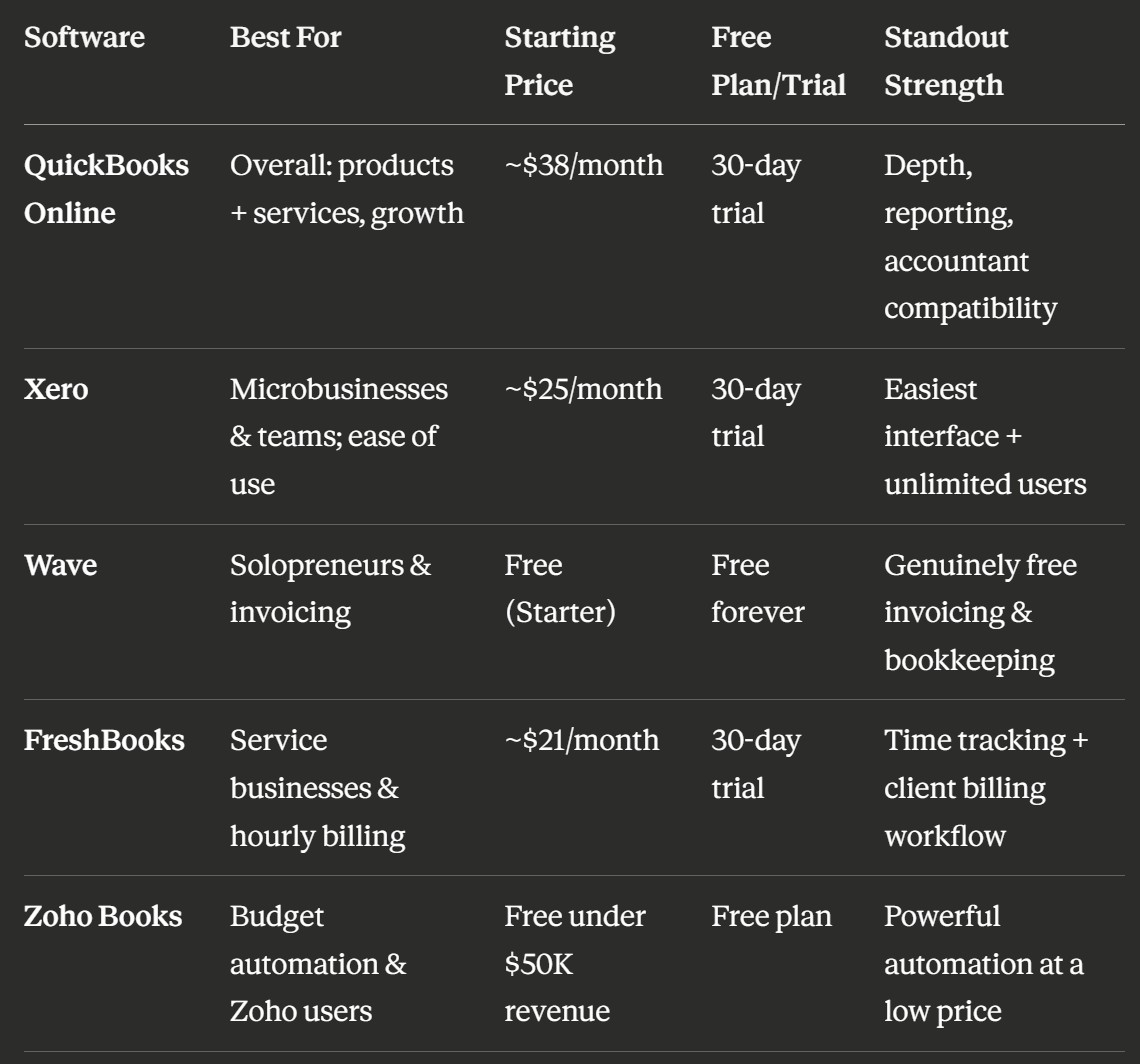
Prices reflect published US rates as of mid-2026 and change often — confirm on each vendor's pricing page before deciding.
_______________________________________________
Why Accounting Software Matters for Small Businesses
Owning a small business doesn't make you an accountant, and good software means you never have to become one. Modern platforms pull transactions straight from your bank, keep invoices and expenses organized, and turn the mess into reports you can actually act on. The payoff is fewer errors, faster tax seasons, and a real-time picture of whether you're making money — which is why over 80% of small businesses now run their books in the cloud.
_______________________________________________
The 5 Best Accounting Software Options for Small Businesses in 2026
1. QuickBooks Online - Best Overall
Best for: Businesses selling both products and services, and any company planning to grow.
QuickBooks Online remains the market leader because it does almost everything well: receivables, payables, projects, payroll, and best-in-class reporting, backed by 750+ integrations including Shopify and Amazon. Its inventory management is the most advanced of any platform mentioned here — purchase orders, multi-location stock, assemblies, and COGS reporting — though it's reserved for the Plus tier and above. It's also the platform most accountants know best, which makes handing off your books painless; the trade-off is price.
- Pros: Deepest feature set; most advanced built-in inventory (Plus tier and up); unmatched accountant and integration ecosystem; scales to 25 users
- Cons: Priciest option with regular price hikes; per user charged, inventory requires the ~$115/mo Plus plan; payroll costs extra; steeper learning curve
- Pricing: Simple Start ~$38/mo → Essentials ~$75/mo → Plus ~$115/mo → Advanced ~$275/mo
Bottom line: If you're unsure where to start or plan to work with an accountant, QuickBooks is the safest default.
_______________________________________________
2. Xero - Best for Microbusinesses & Teams (Easiest to Use)
Best for: Owners who want accounting to feel effortless, and any business where more than one person touches the books, and has basic inventory needs.
Xero built its brand on "beautiful accounting," and the polish shows: the interface is clean and uncluttered, and bank reconciliation is so streamlined it takes minutes, not hours. That ease of use makes it a favorite of solopreneurs and microbusiness owners with no bookkeeping background — while its second superpower, unlimited users on every plan, makes it the best-value choice for teams. Basic inventory tracking is also included on every plan, which covers simple stock needs that QuickBooks reserves for its pricier tiers.
- Pros: Easiest, most intuitive interface; unlimited users at every tier; pleasant automated reconciliation; basic inventory on all plans; 1,000+ integrations
- Cons: Payroll is a separate add-on; entry plan caps monthly invoices; inventory stays basic (assemblies, serial/lot, or multi-location tracking means third party integration)
- Pricing: Early ~$25/mo → Growing ~$55/mo → Established ~$90/mo
Bottom line: Whether you're a one-person shop that values convenience or a growing team with basic inventory needs, Xero delivers the best combination of ease and value.
_______________________________________________
3. Wave - Best for Solopreneurs (Unlimited invoicing)
Best for: Solopreneurs and side hustlers whose main need is sending invoices and getting paid — at zero cost.
Wave's Starter plan gives you unlimited professional invoices, expense tracking, and core bookkeeping for exactly $0 — no trial clock, no revenue cap. Wave earns money on payment processing and payroll rather than subscriptions, so the free tier is genuinely free, and the invoicing workflow (create, send, accept card payment, auto-record) is remarkably smooth for a no-cost tool. Just know its ceiling: no inventory, limited reports, and you'll outgrow it once you hire.
- Pros: Truly free invoicing and bookkeeping forever; simple to learn in an afternoon; ideal under ~50 transactions/month
- Cons: No inventory management; limited reports and integrations; minimal support; limited accountant access
- Pricing: Starter — free. Pro plan and paid add-ons (payments, payroll) available.
Bottom line: The smartest $0 starting point for a solo operation built around invoicing — plan to graduate to Xero or QuickBooks as you grow.
_______________________________________________
4. FreshBooks - Best for Service Businesses & Hourly Billing
Best for: Consultants, agencies, and creatives who bill clients by the hour, project, or retainer.
FreshBooks is purpose-built for client work: estimates convert to projects, projects to tracked time, and time to polished invoices clients can pay by card in one click. Its billing workflow — automatic reminders, late fees, retainers, project profitability — is the most complete in the industry. It's less suited to product businesses, and per-seat fees plus client caps on lower tiers can add up as you scale.
- Pros: Industry-leading invoicing and built-in time tracking; strong customer support; friendly for non-accountants
- Cons: Client caps on lower tiers; extra cost per team member (~$11/user/mo); weak inventory and lighter reporting
- Pricing: Lite ~$21/mo (5 clients) → Plus ~$38/mo (50 clients) → Premium ~$67/mo (500 clients)
Bottom line: If your business is "track hours, bill clients, get paid," FreshBooks handles that loop better than anyone.
_______________________________________________
5. Zoho Books - Best Value (Budget Automation)
Best for: Budget-conscious owners and anyone already using Zoho CRM or the wider Zoho suite.
Zoho Books punches far above its price, packing automated workflows, approval processes, project billing, and solid inventory tracking into plans that undercut every major rival — and it's completely free for businesses under $50,000 in annual revenue. The catch for most businesses is no inbuilt payroll, but it integrates seamlessly with Zoho Payroll (available in the USA, UAE, and India) and third-party apps like SurePayroll (US) or KeyPay/CloudPayroll (Australia/UK). If payroll isn't a priority, it's the best value on this list.
- Pros: Generous free plan; strong automation at every tier; seamless fit with 50+ Zoho apps
- Cons: No inbuilt payroll; fewer accountants familiar with it; slower initial setup
- Pricing: Free (under $50K revenue) → Standard ~$15/mo → Professional ~$40/mo → Premium ~$60/mo
Bottom line: The most software per dollar in the market — especially if you already live in the Zoho ecosystem.
_______________________________________________
Other Options Worth Considering
Two platforms didn't make our top five but deserve a mention for specific situations. Sage 50 is a desktop-first system with robust job costing, deep inventory, and offline access — a fit for manufacturing and construction firms, though it requires an annual commitment and has no mobile app. Odoo is an open-source ERP whose accounting module is free as a standalone app; it's compelling if you want accounting, inventory, CRM, and e-commerce in one system, but expect a heavier setup than any tool above.
_______________________________________________
Which Should You Pick? A 30-Second Decision Guide
Answer these in order and stop at the first match. Solo and need free invoicing? → Wave. Want the easiest experience, or have a team sharing the books, with basic inventory need? → Xero. Bill clients by the hour or project? → FreshBooks. On a tight budget without US payroll needs? → Zoho Books. Easy to setup, online, feature rich software → QuickBooks Online. But if you have a fast growing business with more complex needs → you may consider looking into Odoo.
_______________________________________________
Frequently Asked Questions
1. What is the best accounting software for a small business in 2026?
QuickBooks Online is the best overall choice in 2026 for its feature depth, 750+ integrations, and accountant familiarity. Xero is best for microbusinesses and teams thanks to its ease of use and unlimited users, Wave is best free for solopreneurs, FreshBooks for service billing, and Zoho Books for value.
2. Which accounting software is easiest to use?
Xero is the easiest full accounting platform to use in 2026 — its clean interface and streamlined bank reconciliation live up to its "beautiful accounting" reputation. Wave and FreshBooks are also very beginner-friendly for simpler invoicing-focused needs.
3. Is there truly free accounting software?
Yes. Wave's Starter plan is free indefinitely with no revenue cap, covering invoicing, expense tracking, and core bookkeeping. Zoho Books is free for businesses earning under $50,000 per year. Both charge separately for payment processing and payroll.
4. QuickBooks or Xero - Which is better value?
For a solo owner needing integrated payroll, QuickBooks often wins as Xero has built-in payroll in select regions (like the UK, Australia, and New Zealand) and you may have to integrate third party payroll. For everyone else — especially teams — Xero usually delivers better value, since unlimited users on every plan avoids the per-seat and per-tier costs that make QuickBooks expensive as you add people.
5. Which is better for inventory - QuickBooks or Xero?
QuickBooks has the more advanced inventory system — purchase orders, multi-location stock, assemblies, and COGS reporting — but only on its Plus plan (~$115/month) and above. Xero includes basic inventory tracking on every plan, making it the better value for simple stock needs; complex product businesses on Xero typically add a third-party inventory app.
6. How much does small business accounting software cost per month?
Expect $0–$40/month for entry-level plans (Wave free, Zoho ~$15, FreshBooks ~$21, Xero ~$25, QuickBooks ~$38) and $60–$115/month for mid-tier plans with inventory, projects, and multiple users. Payroll typically adds $40–$70/month plus per-employee fees.
7. Do I still need an accountant if I use accounting software?
For daily bookkeeping, usually not — But software only records transactions; it doesn't plan taxes, advise on business matters, or catch what you're missing. Most owners pair software for the day-to-day with a professional for strategy and filing.
8. Can I switch accounting software later?
Yes, and many businesses do — a common path is starting with a software that has free plan like Wave, then moving to Xero or QuickBooks Online once they hire or add inventory. Switch at a clean break point like the start of a fiscal year, and export your full historical records first.
_______________________________________________
Final Verdict
There's no single "best" accounting software — only the best fit for where your business is right now. Start with the 30-second decision guide above, take the free trial, run a real month of transactions through it, and confirm your accountant can work in it. The best software is the one you'll actually use every week, because clean, current books are the foundation of every good business decision.
_______________________________________________
Prices and features verified against publicly available information as of July 2026 and subject to change. This article is for customer awareness purposes only.