In Brief:
To choose the right accounting software, follow five steps:
(1) Define your business needs by size and industry,
(2) Shortlist features that automate your most time-consuming tasks,
(3) Verify tax and compliance support for your country,
(4) Calculate the true total cost including add-ons and per-user fees, and
(5) Confirm accountant/team compatibility, then trial your top pick with a real month of transactions.
Getting this right matters: cash flow problems contribute to 82% of small business failures (U.S. Bank), and the right software is your first line of visibility.
_________________________________________________________________
Why This Decision Matters More Than You Think
The stakes behind this choice are bigger than a monthly subscription fee. A widely cited U.S. Bank study found that poor cash flow management contributes to roughly 82% of small business failures, and JPMorgan Chase Institute research across 597,000 business accounts found the median small business holds just 27 days of cash buffer — about four weeks of runway. Your accounting software is the system that tells you where you stand before those four weeks run out.
The time cost is just as real. According to SCORE, small business owners spend more than 20 hours per month on financial tasks like bookkeeping and invoicing — roughly 25% of a standard work week. Choosing well converts much of that time back into selling, building, and serving customers; choosing poorly locks it in.
_________________________________________________________________
Step 1: Understand Your Business Needs First
Different businesses need fundamentally different tools, so start with your business model, not a features list. A retail store lives or dies on inventory tracking and point-of-sale integration; a consultancy needs invoicing and time tracking; a contractor needs job costing. Write down the three financial tasks that consume most of your week — that list, not a vendor's marketing page, is your real requirements document
The most common mistake is buying for the business you hope to be in three years — you'll pay for complexity you don't use and abandon the tool. The second most common is buying only for today with no upgrade path, forcing a painful migration later. Aim for a platform whose next tier up fits your two-year plan.
_________________________________________________________________
Step 2: Evaluate Features That Support Your Growth
The right features are the ones that automate your specific bottlenecks — and the payoff is measurable. A 2024 study published by the Kisa Institute found that businesses adopting cloud-based accounting systems reported a 35% reduction in accounting errors and average time savings of about 20 hours per month, while 65% of adopters cited cost savings as a primary driver, reporting accounting expense reductions averaging 25%.
Features worth prioritizing, in rough order of impact:
- Automatic bank reconciliation — live bank feeds that match transactions to statements are the single biggest time-saver in modern accounting software
- Invoicing with online payments — invoices with embedded payment links get paid faster, directly attacking the receivables delays behind most cash crunches
- Expense and receipt capture — photographing receipts from your phone eliminates the shoebox problem and keeps deductions from leaking
- Customizable reporting — profit and loss, balance sheet, and cash flow reports you can filter by product line, location, or project
- Integrations — connections to your payment processor, payroll, e-commerce platform, and CRM prevent double data entry
- AI-assisted automation — auto-categorization and cash-flow forecasting have become standard; in one 2026 industry survey, accountants ranked time savings (66%) and task automation (64%) as AI's biggest benefits
Match the feature to the bottleneck: if unpaid invoices are your problem, weight invoicing and payment features; if data entry is, weight bank feeds and receipt capture. A feature you won't use weekly shouldn't influence your decision at all.
_________________________________________________________________
Step 3: Check Tax and Compliance Support for Your Country
Accounting software must fit your jurisdiction before it fits your workflow. Confirm the platform handles your local sales tax, VAT, or GST correctly, produces the filings and reports your tax authority expects, and supports the e-invoicing mandates now rolling out in dozens of countries.
Compliance failures are expensive in both penalties and time, and the regulatory direction is one-way: more digitization, more real-time reporting, shorter filing windows. Choosing a major cloud platform helps here, since tax-rule updates ship automatically — one reason 82% of accountants now say they prefer cloud-based tools over desktop software.
________________________________________________________________
Step 4: Compare True Costs, Not Sticker Prices
The advertised monthly price is rarely what you'll pay, and the gap widens as you grow. QuickBooks Online, for example, raised prices 15–25% across all plans in May 2026, continuing a pattern of roughly annual increases across the industry — so model your cost at renewal rates, not promotional ones.
Build a 12-month total cost of ownership (TCO) that includes:
- Base subscription at full renewal price, not the intro discount
- Per-user fees — some platforms charge per seat or gate user counts by tier; others (like Xero) include unlimited users
- Migration and setup time — your hours are a cost too
Further add-ons worth considering for medium to large companies:
- Payroll add-ons — typically $40–$70/month plus $5–$6 per employee per month
- Payment processing — usually ~2.9% + $0.30 per card transaction, which matters if clients pay invoices online
- Third-party apps — advanced inventory tools, for instance, commonly add $200–$500/month if your platform's native features fall short
Weigh that TCO against the return: studies of cloud accounting adopters report meaningful ROI within the first year, driven by error reduction, faster invoicing cycles, and reclaimed owner time. A $50/month difference between platforms is trivial next to 20 recovered hours a month — price the outcome, not the subscription.
________________________________________________________________
Step 5: Trial Before You Buy, and See if You Can Train Your Accountant or Team
This factor is underrated and often decisive: software your accountant can't or won't work in costs you real money in exported reports, duplicated work, and billable hours. See if your accountant or bookkeeper is trained or can be trained before you shortlist — in the US, QuickBooks has near-universal accountant coverage, while Xero's network is strongest in the UK, Australia, and New Zealand.
Then run a structured trial. Shortlist a platform, take their free trial (every major vendor offers ~30 days), and push one real month of your own transactions through each: connect your bank, send actual invoices, run a reconciliation, and pull the reports you'd use monthly. An hour of hands-on testing with your own data reveals more than any review — including this one.
________________________________________________________________
Choosing by Business Size: A Closer Look
Solopreneurs and freelancers
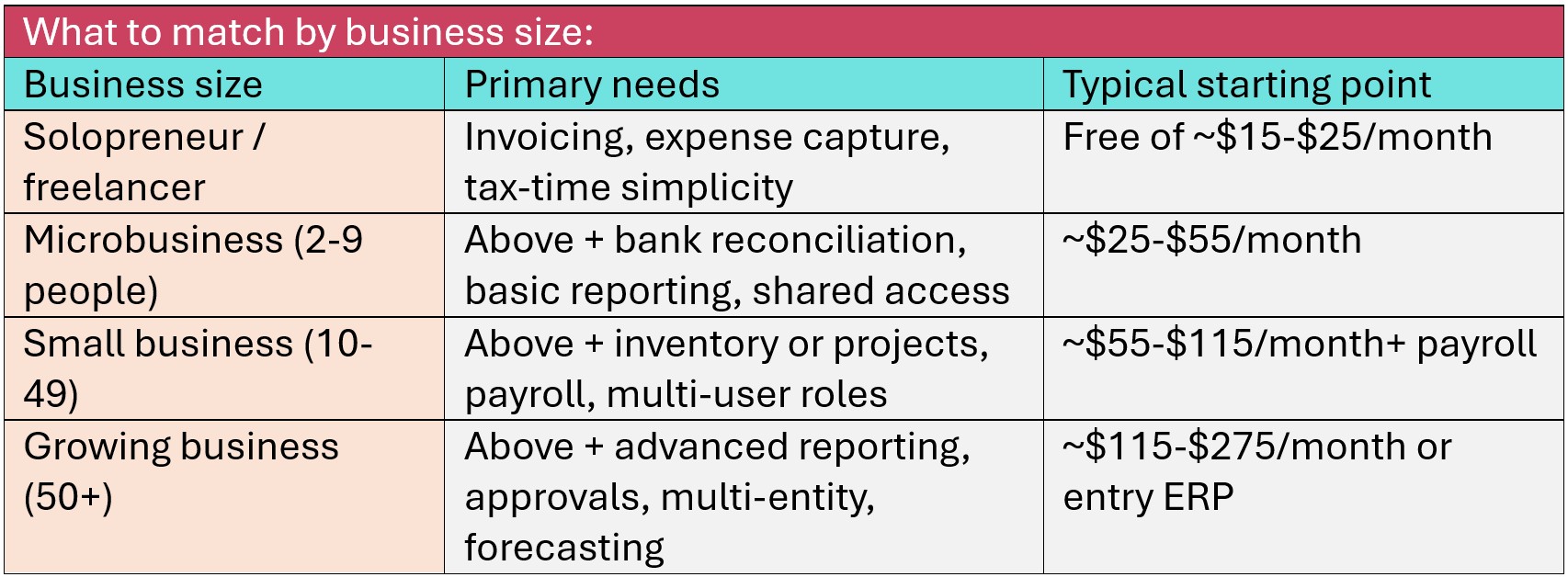
Your priorities are invoicing speed, expense capture, and tax-time simplicity — not feature depth. Free tools like Wave, or entry plans from Zoho Books and Xero, cover this stage well, and U.S. Bureau of Labor Statistics (BLS) data showing 20.4% of new businesses fail in their first year argues for keeping fixed costs minimal while you validate. Upgrade triggers: your first hire, your first inventory, or crossing roughly 50 transactions a month.
Microbusinesses (2-9 people)
Shared access becomes the deciding factor: you, a partner, and a bookkeeper all need eyes on the same live numbers. Per-seat pricing starts to bite here, which is why unlimited-user models can undercut nominally cheaper rivals once three or more people touch the books. Prioritize bank feeds, role-based permissions, and a clean audit trail.
Small businesses (10-49 people)
Payroll, inventory or project accounting, and approval workflows move from optional to essential, and this is where platform choice compounds — Federal Reserve survey data shows 44% of small businesses experienced a cash flow problem severe enough to miss payments in the past year, and mid-tier reporting is what lets you see those crunches coming. Budget realistically for the mid-tier plans ($55–$115/month) plus payroll, and involve your accountant in the selection.
Growing businesses (50+ people)
You're approaching the ceiling of small business accounting software: multi-entity consolidation, revenue recognition, forecasting, and granular permissions point toward top-tier plans (QuickBooks Advanced, Xero Established) or entry ERP systems (NetSuite, Sage Intacct, Odoo). The evaluation changes too — think in implementation projects and annual contracts, and pilot with your finance lead, not just the owner.
________________________________________________________________
Common Mistakes to Avoid
Four errors account for most bad software choices. Buying on price alone — a free tool that costs you ten hours a month is the most expensive option on the list. Ignoring the upgrade path — migrations are painful enough that practitioners advise switching only at fiscal-year boundaries with full data exports. Skipping the trial — dashboard screenshots hide workflow friction that one real reconciliation exposes. Deciding without your accountant — the person doing your year-end work should be involved in the process of selecting the software.
________________________________________________________________
Frequently Asked Questions
1. How do I choose accounting software for my small business?
Follow five steps: define your needs by business size and industry, prioritize features that automate your biggest time drains (bank reconciliation and invoicing first), verify tax compliance for your country, calculate 12-month total cost including per-user fees and payroll (if needed), and trial your top two picks with a real month of transactions after confirming your accountant supports them.
2. What features matter most in accounting software?
Automatic bank reconciliation and invoicing with online payments deliver the most impact for most businesses. Studies of cloud accounting adopters report roughly 35% fewer accounting errors and around 20 hours saved per month, driven mainly by bank feeds, auto-categorization, and automated invoicing.
3. How much should a small business spend on accounting software?
Expect $0–$25/month as a solopreneur, $25–$55/month as a microbusiness, and $55–$115/month plus payroll (typically $40–$70/month plus per-employee fees) as a team of 10–49. Model costs at full renewal prices — major vendors have raised prices 10–25% in recent years.
4. Is cloud accounting software better than desktop?
For most businesses, yes. Roughly three in four US small and mid-sized businesses now use cloud accounting, and 82% of accountants prefer cloud tools, citing real-time data, anywhere access, and automatic tax-rule updates. Desktop software like Sage 50 remains relevant mainly for firms needing offline access or heavy job costing.
5. When should I switch accounting software?
Switch when you've hit a structural ceiling — user limits, missing inventory or payroll, or compliance gaps or require customizing — not to chase a small price difference. Time the migration to the start of a fiscal year, export complete historical records first, and involve your accountant; a botched migration costs more than years of subscription savings.
Do bigger businesses need different accounting software?
Yes. Below ~10 people, ease of use and cost dominate; from 10–49, payroll, inventory, and approval workflows become essential; beyond ~50, multi-entity consolidation and forecasting push businesses toward top-tier plans or entry ERP systems like Odoo or NetSuite or Sage Intacct.
________________________________________________________________
The Bottom Line
Choosing accounting software is really a decision about visibility: whether you'll see a cash crunch four weeks out or discover it at payroll. Work the five steps — needs, features, compliance, true cost, accountant or team fit — trial two finalists with real data, and pick the one your team will actually use every week. For our tested recommendations by category, see our companion guide: Best Accounting Software for Small Businesses in 2026: Reviews, Comparison & How to Choose - Qin Systems
________________________________________________________________
Sources & Statistics Cited
- U.S. Bank (study by Jessie Hagen) — poor cash flow management contributes to ~82% of small business failures; widely cited by SCORE and the SBA
- JPMorgan Chase Institute — analysis of 597,000 small business accounts: median cash buffer of 27 days; ~25% of businesses hold 13 days or fewer
- Federal Reserve, Small Business Credit Survey (2024) — 44% of US small businesses experienced a cash flow problem severe enough to miss payments in the prior 12 months
- SCORE — small business owners spend 20+ hours per month on financial tasks including accounting and invoicing
- U.S. Bureau of Labor Statistics, Business Employment Dynamics — 20.4% of new businesses fail within one year; 49.4% within five years
- Kisa Institute (2024) — cloud accounting adopters report ~35% fewer accounting errors, ~20 hours/month saved, and average 25% reduction in accounting expenses
- Industry adoption surveys (2025–2026) — ~75–80% of US SMBs have adopted cloud accounting; 82% of accountants prefer cloud-based tools
- Vendor pricing pages (verified July 2026) — QuickBooks Online raised prices 15–25% across plans in May 2026; payroll add-ons typically $40–$70/month plus per-employee fees
Statistics compiled from the primary sources above as reported in industry research; verify current figures against original publications before citing. This article is for educational purposes and is not financial advice.